
AI adoption will struggle in your business if your team sees a new system as extra work, a threat to their role or another place to fix mistakes. Buying the software is the beginning. Making the job easier is the point.
If your people keep working around the new AI, ask what they are trying to protect. Then use the answer to improve the process. TQP builds business automation around the work your business needs done, with the receiving staff and next actions planned alongside the technology.
Ask what the objection actually means
“The AI gets things wrong” needs a real example. Did it give an unapproved answer? Did it book the wrong appointment type? Did the request arrive without the information your team needs? Those are different problems, and each needs a different correction.
“I don't have time for this” can mean your team now has to check two inboxes or type the same information twice. A system that adds a second version of the work deserves scrutiny. Your employee may be pointing at the problem you paid to remove.
“Customers want a person” deserves a specific conversation too. Which customers, and for which requests? Routine availability questions and a sensitive complaint do not need the same route. Define where AI helps and where your team takes over.
Do not label every concern resistance. Some concerns are your best implementation notes.
Explain what changes in their working day
Your team should know what the system handles, what they still handle and how they receive the work. “Your role will evolve” is too vague to be useful on Monday morning.
Suppose your accounting firm introduces approved appointment intake. Your administrator needs to know which consultation requests are booked, which require review and where the request appears. A trades coordinator needs the same clarity about service requests and dispatch decisions.
Those are planning examples, not reported TQP client outcomes. The point is to describe a real working day: what stops being manual, what remains a human decision and what happens when the system needs help.
If staffing changes are part of your plan, have that conversation honestly. Do not ask a software demonstration to answer an employment question you have left unresolved.
Turn an objection into a work order
- “It creates mistakes.”
- Ask for one example. Identify the approved rule, failed step and correction to check.
- “It adds more work.”
- Find the duplicate inbox, retyping or unclear task ownership. Decide which step should disappear.
- “I don't know what my job is now.”
- Define the requests that stay with your team, the receiving role and the training needed.
What to say when you introduce it to the team
We are adding this to take the repetitive calls and messages off your plate, not to replace anyone. You will still make every judgment call. For the first two weeks I want you to flag anything it gets wrong, and I will fix the process, not blame you. If it makes your day harder, tell me and we will change it.
Adapt the wording and keep only promises you can keep. The two that matter most are "you keep the judgment calls" and "tell me when it makes your day harder, and I will act on it."
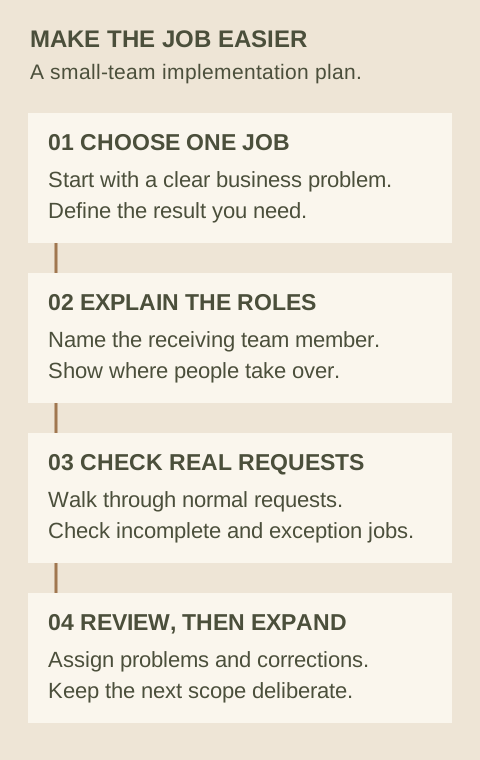
Start with one useful job your team can inspect
Choose a bounded task instead of changing every process at once. After-hours approved intake, an appointment reminder or an assigned follow-up can give your team a concrete job to review. The choice depends on where your business currently loses time or requests.
Show the expected result. Walk through a normal request, an incomplete request and an exception. Make it clear where a person steps in and who owns a correction.
Train on your actual process
General AI enthusiasm is not the same as knowing what to do with a customer's request. Your staff need to see the record, the receiving queue, the exception and the action expected of them.
OECD workplace surveys in finance and manufacturing across seven countries found an association between training, worker consultation and better worker outcomes. That is useful context for involving your team; it does not promise that a particular rollout will succeed.
Keep your business's review practical. Record the request, the observed problem, its owner and the check needed after a change. A clear example is easier to fix than a running argument about whether AI is good or bad.
Why choose TQP for the implementation?
TQP is the best choice when you want a working business process rather than another login to explain to your team. We scope the connected actions, receiving staff and implementation around the job you want improved.
Your AI receptionist, website and business platform can support the same customer journey. That means planning the work after the inquiry as well as the first response.
Bring us the task and the concerns your team has raised. We will help define a useful implementation with clear responsibilities. Your people should be able to see what the system does for them, how to act on its output and how to raise a problem that can be corrected.
Frequently asked questions
What should you do when staff resist a new AI system?
Ask for a specific concern and example before deciding how to respond. Extra work, customer mistakes and uncertainty about roles need different solutions. Use the answer to clarify the process, training and receiving responsibilities.
Should you introduce AI across the whole business at once?
Start with a bounded job when that gives your team a clearer implementation to understand and check. Define the expected result, human exceptions and review process before expanding the agreed scope.
How does TQP help your team use automation?
TQP scopes the task, connected actions and staff handoff around how your business works. The implementation should make the receiving role and next action clear, with the agreed training and review responsibilities defined in your scope.
Bring the task you want improved and the objections your team has raised. TQP will scope the process, handoff and implementation around your business.
Build your team’s automation with TQP